Table of Contents
Generative Adversial Networks(GANs)
Generative Aversarial Networks are a type of neural network that can be used to generate fake images that are near identical to real images. These networks were first introduced by Goodfellow et al. in their 2014 paper, Generative Adversarial Networks[1].
How are the images generated?
With GANs we use two neural networks for training. Firstly, we have a generator G(x). This network recieves an input of randomly generated noise. It is trained to output imitation images that eventually become near-identical images to their ground-truth originals. We also have a discriminator(adversary) D(x), that determines whether a given image is real or fake.
Both of these models play an adversarial game where the generator will try to fool the discriminator by generating data that is similar to those in the training set [2]. As mentioned, the generator will attempt to generate images from random noise. The discriminator, which is learning to determine whether images are real or fake, will guide the generator by determining if the generators images are real or fake. During training, the generator will progressively become better at creating iamges that look real, while the discriminator will become better at telling them apart.
The process reaches equilibrium when the discriminator can no longer distinguish real images from fake[3].
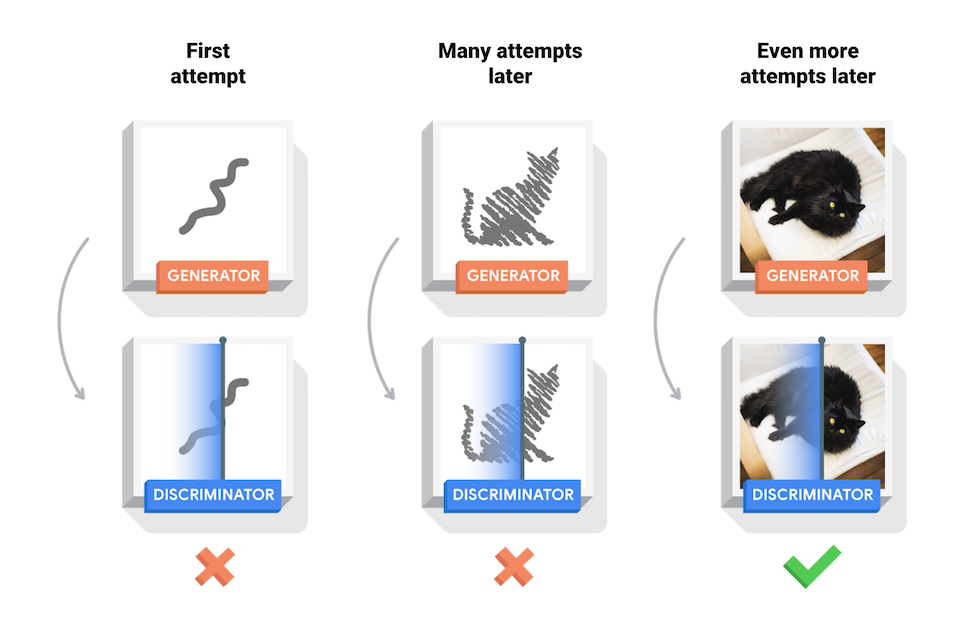
Here we can take a look at a GAN during it’s training:

The author for the results above can be found here.
Training our own GAN
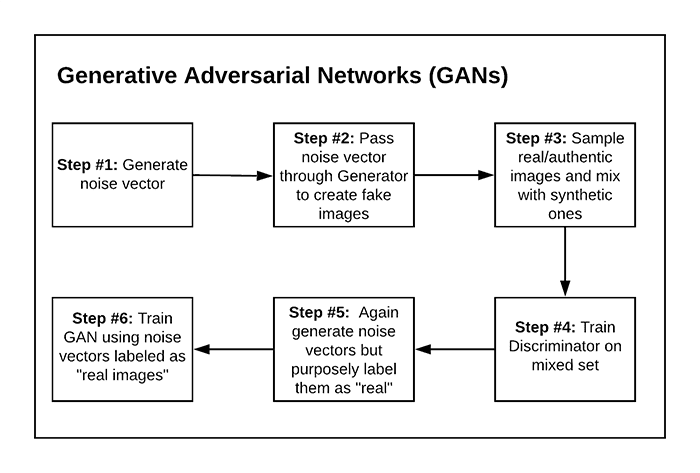
Above we can see the typical training procedure for a GAN.
GAN’s are notoriously hard to train. For that reason, in our workshop we will be coding a Deep Convolutional Generative Adversarial Network (DCGAN). A DCGAN is a type of GAN architecture. We will be using this GAN architecture because of its simplicity and effectiveness.
There are many GAN architectures that have their own application. A very in depth breakdown of different architectures can be found in this article.
Let’s get started
Typically in our coding sessions we implement most of the model ourselves. Due to the explanation required and complexity of the structure of the models. We will have the basic implementation of a DCGAN coded.
For this workshop, we will be using the MNIST dataset in order to trian our DCGAN model to create images of hand drawn numbers.
For the live coding Click Here
For the code used Click Here
Setting up
As usual we include our imports
import tensorflow as tf
from tensorflow.keras import layers
import matplotlib.pyplot as plt
import numpy as np
import time
We will be using Tensorflow and Keras for this in order to code our GANs. If you’re not familiar with either libraries I suggest you checkout my previous workshop Tensorflow and Neural Networks.
We also include Matplotlib in order to plot our images and Numpy for some of the numerical computations we perform.
Now that we have our imports ready, let’s go ahead and load in our data. We are using the MNIST data set. As mentioned in our previous workshops, MNIST is built in to tensorflow, so we can directly import it from the library.
(train_images, _), (_, _) = tf.keras.datasets.mnist.load_data()
Notice how we use “_” (underscores) when importing our data. Since we only need the training images, we don’t need the train test split in unsupervised learning, we just store the train images and assign the other lists to nameless variables which we won’t use. Our goal isn’t to minize loss or obtain a high accuracy, we are looking to find the equilibrium between the generator and discriminator.
train_images = train_images.reshape(train_images.shape[0], 28, 28, 1).astype('float32')
train_images = (train_images - 127.5) / 127.5  # Normalize the images to [-1, 1]
We also reshape our image in order to include the dimensions of the channels and normalize them to be between -1 and 1. We do this because this is the range for tanh, which we will be using for our output layer.
BUFFER_SIZE = 60000
BATCH_SIZE = 256

train_dataset = tf.data.Dataset.from_tensor_slices(train_images).shuffle(BUFFER_SIZE).batch(BATCH_SIZE)
We then set our buffer and batch size values and create our training dataset. If your not familiar with buffers or batches, we’ll break them down:
-
Our batch size is the amount of training samples we want iterate through before our model updates its parameters. A smaller batch size updates parameters more quickly however can be more unstable. A larger batch size updates parameters more slowly but can yield sub optimal results.
-
The buffer is more related to tensorflows shuffle(). The buffer is used to randomly shuffle a specific amount of data. If we set the buffer to the size of the dataset, then it shuffle the entire dataset.
The Generator
This portion make time some time to read over because of the complexity of certain concepts. First I’ll break down different concepts implemented, then we’ll look at the code.
First we need to understand Conv2DTranspose. This process is upsampling our data, which is the opposite of Conv2D. Instead of downsampling we are upsampling.

Next let us take a look at batch normalization. We use this in order to normalize our data. While we did enforce our normalization outside of the model, this internal normalization helps to make sure all data is uniform and speeds up training time[4].
Leaky ReLU will be the main activation function we use in our model. Similar to the previous ReLU activation function we’ve gone over, leaky ReLU is a slight modification of ReLU. The benefit of this is it solves the dead ReLU problem. This issue means that a neuron is dead if it is below 0. Leaky ReLU solves this issue by introducing a small slope on the left of the axis.

Lastly, we’ll take a look at tanh. This is the activation function we use for our output layer. We use this activation function as it was the recommended activation function from the original DCGAN paper. Tanh is a hyperbolic activation function shown below:

Now that we understand a couple basic functions, let’s dive into the code. First we’ll define the model and create the input layer.
def make_generator_model():
    model = tf.keras.Sequential()
    model.add(layers.Dense(7*7*256, use_bias=False, input_shape=(100,)))
    model.add(layers.BatchNormalization())
    model.add(layers.LeakyReLU())
This is our first layer. Notice how for our dense layer, we used 7 x 7 x 256. This concept will make more sense as we progress but we are trying to turn an image of shape 100 X 1 into an image of 28 X 28. For this we would gradually upsample our image until we transform our 100 X 1 image to a 28 X 28 X 1 image.
    model.add(layers.Reshape((7, 7, 256)))
    assert model.output_shape == (None, 7, 7, 256)
Next we reshape our input and use assert in order to make sure that our data was properly reshaped.
    model.add(layers.Conv2DTranspose(128, (5, 5), strides=(1, 1), padding='same', use_bias=False))
    assert model.output_shape == (None, 7, 7, 128)
    model.add(layers.BatchNormalization())
    model.add(layers.LeakyReLU())
Now we have our first upsampling layer. Here we take our data and create 128 filters by using a 5 X 5 kernel with a stride of 1. by specifying padding same, we make sure to keep our output image the same dimensions except now with only 128 filters.
    model.add(layers.Conv2DTranspose(64, (5, 5), strides=(2, 2), padding='same', use_bias=False))
    assert model.output_shape == (None, 14, 14, 64)
    model.add(layers.BatchNormalization())
    model.add(layers.LeakyReLU())
Next we perform the same operation except change our dimensions to get closer to our expected out image size.
    model.add(layers.Conv2DTranspose(1, (5, 5), strides=(2, 2), padding='same', use_bias=False, activation='tanh'))
    assert model.output_shape == (None, 28, 28, 1)

    return model
Finally we transform our image into the 28 X 28 X 1 and return our model. Through this process we essentially took a 100 X 1 image that was filled with noise and transformed it to a 28 X 28 X 1 image.

The Discriminator
For the discriminator we perform the operation of the generator but backwards. We transform our image from 28 X 28 X 1 to 100 X 1 in order to compare.
def make_discriminator_model():
    model = tf.keras.Sequential()
    model.add(layers.Conv2D(64, (5, 5), strides=(2, 2), padding='same', input_shape=[28, 28, 1]))
    model.add(layers.LeakyReLU())
    model.add(layers.Dropout(0.3))

    model.add(layers.Conv2D(128, (5, 5), strides=(2, 2), padding='same'))
    model.add(layers.LeakyReLU())
    model.add(layers.Dropout(0.3))

    model.add(layers.Flatten())
    model.add(layers.Dense(1))

    return model
Doing this process will allows our discriminator to compare its output with the generated images input.

Losses and Optimizers
Now that we have our models, we must calculate their loss and define their optimizers.
cross_entropy = tf.keras.losses.BinaryCrossentropy(from_logits=True)
First we define a variable to hold the loss. For both models we will be using binary crossentropy which is standard for binary classification.
def discriminator_loss(real_output, fake_output):
    real_loss = cross_entropy(tf.ones_like(real_output), real_output)
    fake_loss = cross_entropy(tf.zeros_like(fake_output), fake_output)
    total_loss = real_loss + fake_loss
    return total_loss
For the discriminators loss, we need to calculate the loss for the real outputs and fake outputs and add them. This will give us the total_loss for the discriminator.
def generator_loss(fake_output):
    return cross_entropy(tf.ones_like(fake_output), fake_output)
The loss for the generator is computed by only taking the logg of the fake outputs
generator_optimizer = tf.keras.optimizers.Adam(1e-4)
discriminator_optimizer = tf.keras.optimizers.Adam(1e-4)
We then define the optimizers for both models. We’ll be using the Adam optimizer as that was the recommended optmizer for the model.
Training
Now that we have everything in place we can begin training our model.
EPOCHS = 50
noise_dim = 100
First we specify the amount of epochs we want our model to go through as well as the noise dimension.
An epoch is the amount of times our model will work through an entire dataset.
@tf.function
def train_step(images):
    noise = tf.random.normal([BATCH_SIZE, noise_dim])

    with tf.GradientTape() as gen_tape, tf.GradientTape() as disc_tape:
      generated_images = generator(noise, training=True)

      real_output = discriminator(images, training=True)
      fake_output = discriminator(generated_images, training=True)

      gen_loss = generator_loss(fake_output)
      disc_loss = discriminator_loss(real_output, fake_output)

    gradients_of_generator = gen_tape.gradient(gen_loss, generator.trainable_variables)
    gradients_of_discriminator = disc_tape.gradient(disc_loss, discriminator.trainable_variables)

    generator_optimizer.apply_gradients(zip(gradients_of_generator, generator.trainable_variables))
    discriminator_optimizer.apply_gradients(zip(gradients_of_discriminator, discriminator.trainable_variables))
First we have to design the logic inside of each training step. notice how we are using a the decorator function here. This converts our function into a tensorflow graph function which is better performant than a regular python function.
We then create our noise images based on the batch size we gave.
Now for the next portion, if you’re not familiar with tensorflows gradients, you might get a little lost. Essentially we are calculating the loss and optimizing the model based on that loss. We do this using tf.GradientTape(). GradientTape allows us to create our training loops through automatic differentiation. Automatic differentiation is a set of techniques that can compute the derivative of a function by repeatly applying the chain rule[5].
By using this we can get our models gradients and then update the weights using these gradients. Our gradients our simply a measurement for the change in all the weights with regard to error. This is why we need to pass in our loss when we calculate the gradient. we then use the gradients to optimize our model.
In previous workshops, these are the steps that were occuring in the background when we would fit() our model. This topic is a little more advanced so don’t worry if you don’t understand it on your first pass.
def train(dataset, epochs):
  for epoch in range(epochs):
    start = time.time()

    for image_batch in dataset:
      train_step(image_batch)
Finally we have our train function that iterates through the epochs and the batches.
train(train_dataset, EPOCHS)
References
The following section include links to various references used throughout this tutorial.
[1] GANs with Keras and TensorFlow
[2] GANs — A Brief Introduction to Generative Adversarial Networks
[3] Deep Convolutional Generative Adversarial Network
[4] Batch Normalization In Neural Networks Explained (Algorithm Breakdown)
[5] Using TensorFlow and GradientTape to train a Keras model